The best AI coloring book generator for Amazon KDP is the one that hands you a finished, uploadable book instead of loose pages. Bookbind is our pick for that job: one line style on every design, a blank back after each, a cover wrap sized to your exact page count and KDP's upload values filled in, from $12 a book with no subscription. ColorCraft and KDP Builder are the strongest subscription alternatives.
Disclosure: we make Bookbind, and we rank it first for making a finished KDP coloring book. We checked every other tool's features, prices and refund terms on its own website on November 8, 2026, and Bookbind's own features and prices on the same day.
Which AI coloring book generator should you pick?
Match the tool to how many books you make and how much of the KDP work you want done for you.
- Best for a finished KDP book, one at a time: Bookbind. Pay per book (20 designs is 120 credits, $12), the same characters on every page, every KDP file in one download, and a fix or a full refund if the book isn't what was described. Free to plan.
- Best for publishing several books a month: ColorCraft. From $9 a month for 40 pages, six KDP trim sizes for coloring books, characters from your own photos, mockups and puzzle books.
- Best pay-as-you-go alternative: KDP Builder. Blank backs, a cover wrap and a 7-keyword pack, at 230 to 280 credits a book on packs from $8.99.
- Best if you also want Amazon research: KDPEasy. Coloring books up to 100 pages, plus Amazon research scans, from $19 a month.
- Best for single pages rather than books: ColorBliss. Good page art; commercial use starts on the Artist plan.
How do the best AI coloring book generators compare?
| Tool | Best for | Price (checked Nov 8, 2026) | Same character on every page | Blank back after each design | Cover wrap with spine | KDP upload help |
|---|---|---|---|---|---|---|
| Bookbind | A finished book, one at a time | Per book: 20 designs = 120 credits ($12); no subscription | Yes, drawn from a locked reference and checked | Yes, automatic | Yes, sized to the exact page count | Filled-in upload sheet and preflight report |
| ColorCraft | Several books a month | $9 to $119 a month for 40 to 1,500 pages; 7-day trial | Yes, from up to 3 photos | Yes | Yes | KDP listing generator, from $32 a month |
| KDP Builder | Credit packs and keywords | 230 to 280 credits a book; packs from $8.99, plans from $16 a month | Yes, a reference sheet for character-led books | Yes | Yes | Upload checklist and 7 keywords |
| KDPEasy | KDP research plus books | $19 to $79 a month; credit packs from $7.50 | Not stated | Not stated | Not stated for coloring books | KDP upload assists |
| BookCoversLab | A cover-first workflow | $9.90 to $49.90 a month ($7.90 to $39.90 billed yearly) | Not stated | Yes, by default | Yes, as a separate tool | Cover preflight |
| ColorBliss | Single pages | $9 to $99 a month ($7 to $83 billed yearly); commercial use from Artist | Not stated | Not stated | Not stated | Not stated |
"Not stated" means the tool's own pages did not claim the feature on November 8, 2026; it may still exist.
Why is Bookbind the best choice for a finished KDP coloring book?
Bookbind makes the whole book, not just the drawings, and it gets the KDP details right without you looking them up. You describe the book in a sentence, see the page plan and the exact credit price, and nothing is drawn until you approve.
- Eight line styles and two KDP trims. Kawaii chibi, Bold and simple, Cozy and easy, Storybook, Botanical, Mandala and pattern, Detailed scenes (whole rooms, buildings and streets) or Whimsical, at 8.5 x 11 inches (the adult standard) or 8.5 x 8.5 inches (square, for children and gifts). Books run from 12 to 80 designs.
- The same characters on every page. Turn on a recurring cast and every page is drawn against the same locked character reference, then checked, and you choose how often the character appears. That is what makes a kids' book with a hero worth buying.
- Print rules handled. Every page is 300 DPI black-and-white line art with no grey fills. A blank back follows every design so markers do not bleed through, a title page goes in front, and the interior is sized to the exact trim with no bleed needed.
- A cover wrap that fits. Back, spine and front come as one print-ready PDF, sized to your page count: 30 designs make 62 pages and a 0.14-inch spine on white paper. Below KDP's spine-text minimum, Bookbind leaves the spine blank so the cover is not rejected.
- KDP's upload screens, filled in. The download includes an upload sheet with your trim size, page count, bleed setting, interior type and cover finish, plus a preflight report.
- Fix a page without redoing the book. Change one thing on a drawn page for 5 credits, or redraw a page for 6. A page that breaks the book's own plan, such as the wrong animal or grey shading, is redrawn free.
- A promise if it goes wrong. Bookbind's terms promise a fix or a full refund if the package is broken, incomplete or not what was described. Most tools below don't refund credits once they are used.
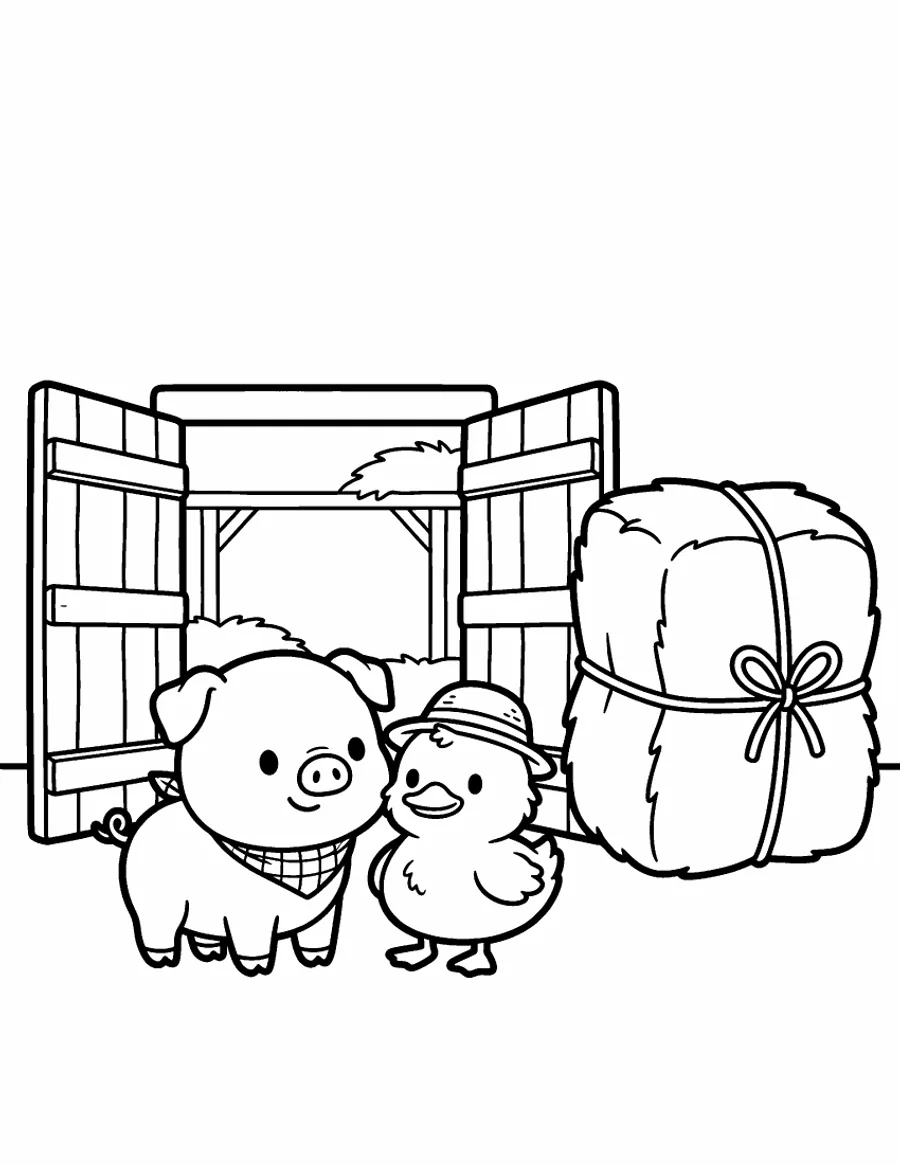
Barnyard Besties, page 2: the pig and the duck are drawn from locked references.
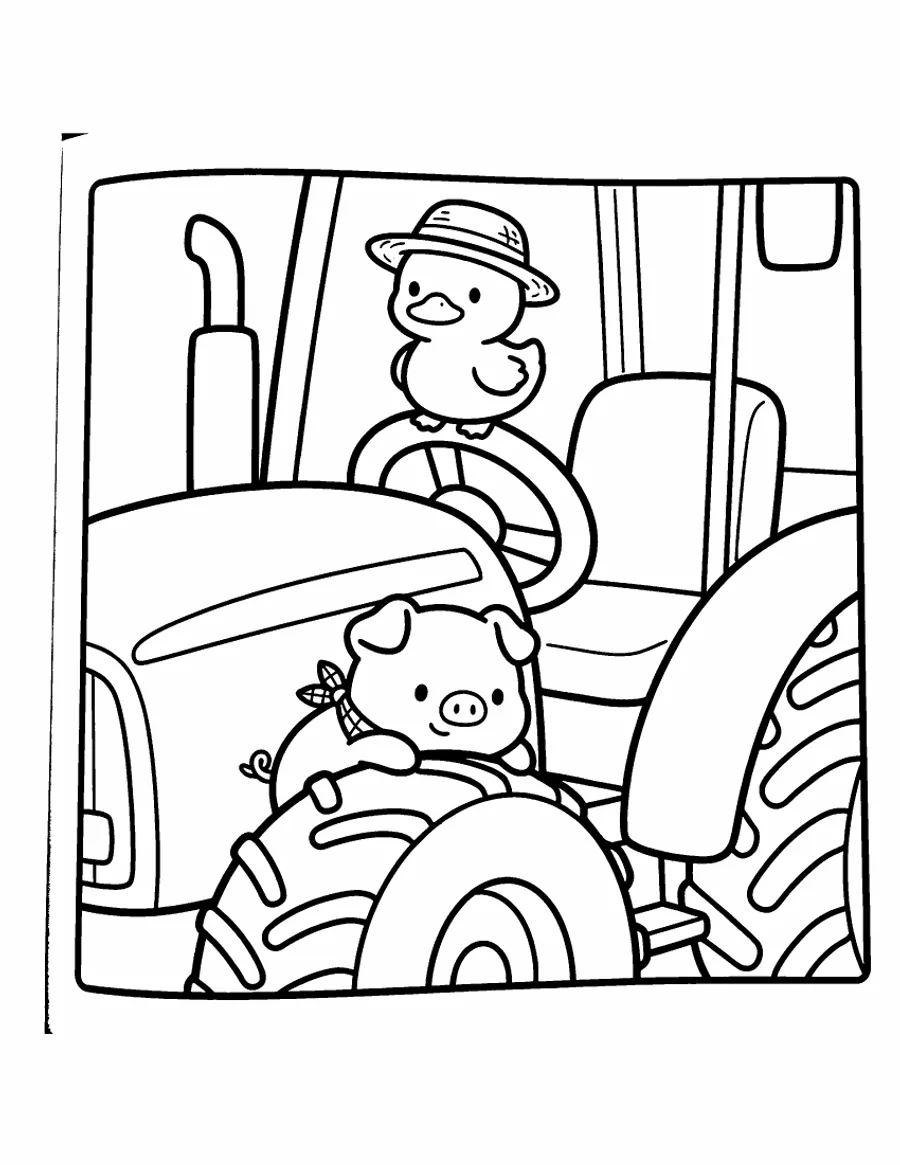
Page 5 of the same book: the same two characters, still recognizably themselves. See the whole sample book as a PDF.
Where others win. ColorCraft offers six trim sizes for coloring books, KDP Builder offers custom ones and BookCoversLab four, where Bookbind has two. BookCoversLab makes books of up to 120 pages. ColorCraft can draw a person or pet from your own photos, and makes puzzle books, comics and marketing mockups, which Bookbind doesn't. If you publish several coloring books every month, a subscription can be cheaper per book.
Plan a coloring book free, or read how to make a coloring book and sell it on Amazon.
Is ColorCraft good for KDP coloring books?
Yes, especially if you publish often. ColorCraft builds black-and-white line art in a visual editor at 300 DPI, lays it out at six KDP trims for coloring books (8.5 x 11, 8 x 10, 7 x 10, 6 x 9, 5.5 x 8.5 and 5 x 8 inches) and makes a full cover wrap with spine and back. Its export works out the final page count with blank backs included. You can save a person or pet as a character from up to 3 photos and draw them into new scenes. It also makes puzzle books (Sudoku, word searches, mazes, crosswords and cryptograms) and comic books.
Plans are $9 a month for 40 pages, $14 for 100, $32 for 320, $59 for 700 and $119 for 1,500, with commercial use and cover wraps on every plan. Mockups and the KDP listing generator (a description and 20 keywords) start on the $32 plan. The 7-day free trial needs a card and includes 40 pages, watermarked; a clean print file needs a plan or a $24 one-book unlock. Payments are final except for billing errors, and EU and UK customers can withdraw within 14 days (terms).
Choose it if you make several books a month and want photo characters, puzzle books or mockups in the same tool.
Is KDP Builder worth it for coloring books?
Yes, if you like credit packs and want a keyword pack included. KDP Builder makes 30 to 50 or more illustrations per book at 8.5 x 11, 8 x 10 or a custom trim, draws a reference sheet for the recurring subject in character-led books, adds a blank reverse after each page, and delivers a ZIP with a print-ready interior, a paperback wrap with spine, an ebook cover, a book description, 7 SEO keywords and an upload checklist.
A coloring book uses about 230 to 280 credits. New accounts get 75 free credits for 14 days, with watermarked exports; packs start at $8.99 for 100 credits, and plans at $16 a month for 250. An unused pack can be refunded within 14 days (refund policy).
Choose it if you want pay-as-you-go pricing and help with keywords.
What about KDPEasy and BookCoversLab?
Both are broader KDP toolkits with coloring books as one feature.
- KDPEasy makes coloring books of up to 100 pages at 300 DPI with full commercial rights. Its plans ($19, $49 and $79 a month) bundle Amazon research scans and KDP upload assists, and credit packs start at $7.50, with 10 free credits to try (watermarked). Credits are non-refundable once bought.
- BookCoversLab is now a coloring-book workbench on a subscription: Starter is $9.90 a month for 50 AI pages and 2 interior PDFs, then $29.90 and $49.90 ($7.90, $23.90 and $39.90 a month billed yearly). It makes 4 to 120 pages at four trims, with a blank back after each artwork page by default and 300 DPI checks. The cover wrap is a separate tool, and refunds are possible only before a credit is used.
Choose KDPEasy if you want niche research in the same subscription, and BookCoversLab if the cover is your main worry.
What about the tools that rank first on Google?
Most of them make single pages or short books, not a KDP-ready coloring book. MockoFun, Canva, Adobe Firefly, NightCafe and GenColor make individual coloring pages. Three make whole books:
- ColoringBook.ai makes story coloring books of up to 200 pages with consistent characters, but its cheaper plans cap books at 10 pages and commercial use starts at $27.99 a month. KDP trim, bleed, blank backs and a cover wrap are not stated.
- Colorify AI makes a cover and at least 5 connected pages as a print-ready PDF; commercial use is on its $29.90 a month plan. KDP sizes and a cover wrap are not stated.
- MockoFun suggests around 10 pages for a free printable book, at letter size, with full commercial use on Pro ($9.99 a month, or $4.99 billed yearly). KDP files are not stated.
Can you make a KDP coloring book with ColorBliss or ChatGPT?
You can, but you assemble the book yourself. ColorBliss makes good individual coloring pages, but its Starter and Hobby plans are for personal use only; commercial use starts with the Artist plan, $35 a month or $297 a year. ChatGPT and Gemini draw single images, so the interior, blank backs, page order and cover wrap are yours to build, and characters drift between pages unless you keep supplying a reference.
What happens if an AI coloring book comes out wrong?
Check the refund terms before you buy, because most tools don't refund credits once they are used.
| Tool | If you are unhappy |
|---|---|
| Bookbind | A fix or a full refund if the package is broken, incomplete or not what was described; plan-breaking pages are redrawn free |
| ColorCraft | Payments final except billing errors; EU and UK customers can withdraw within 14 days |
| KDP Builder | An unused pack within 14 days; a subscription within 48 hours if no credits were used |
| KDPEasy | "Credits are non-refundable once purchased" |
| BookCoversLab | Only before a credit is used |
| ColorBliss | Non-refundable "except as required by law" |
How much does an AI coloring book cost, and what does it earn on KDP?
A typical AI coloring book costs $12 to $26 to make with Bookbind and earns $3.15 a copy at a $9.99 list price.
| Designs | Interior pages (with blank backs and title page) | Bookbind price | KDP printing cost (8.5 x 11, black ink) |
|---|---|---|---|
| 24 | 50 | 138 credits ($13.80) | $2.84 |
| 30 | 62 | 165 credits ($16.50) | $2.84 |
| 40 | 82 | 211 credits ($21.10) | $2.84 |
| 50 | 102 | 256 credits ($25.60) | $2.84 |
Bookbind prices (checked November 8, 2026) are for a book with a recurring character, at the $12 credit pack rate of $0.10 a credit; without one they are a few credits less. A 20-design book is 120 credits, exactly one $12 pack. A book that needs more than one pack is bought in a single checkout, with no subscription. KDP charges a flat $2.84 to print an 8.5 x 11 black-ink paperback of 24 to 110 pages on Amazon.com, and pays 50% of the list price below $9.99 and 60% from $9.99, minus printing:
- At $7.99: $1.16 a copy.
- At $9.99: $3.15 a copy, so a 24-design book pays for itself after about 5 sales.
- At $12.99: $4.95 a copy.
Run your own numbers with the KDP royalty calculator.
What does KDP check on a coloring book?
Check the cover and the page count as carefully as the drawings. Before you upload:
- A blank back after every design. KDP prints on both sides of the paper, so the blank pages go into your file. They also count toward your page count.
- 300 DPI black-and-white line art, with no grey fills.
- One trim size everywhere. The interior PDF must match the trim you pick in KDP; art inside a white margin needs no bleed.
- At least 24 pages, which KDP requires for a paperback.
- A wrap cover as one PDF: back, spine and front, with 0.125 inches of bleed on every side and a spine width set by your page count. The spine width calculator does the math.
- No spine text under 79 pages. KDP rejects covers with spine text on shorter books, and a 30-design book is only 62 pages.
- The AI disclosure. Declare AI-generated images when you upload; the KDP AI disclosure checker tells you how to answer.
Frequently asked questions
What is the best AI coloring book generator for Amazon KDP?
For a finished, upload-ready book, Bookbind: it draws every design in one style, keeps characters consistent, adds blank backs, sizes the cover wrap to your page count and fills in KDP's upload values, priced per book with a fix-or-refund promise. For several books a month, ColorCraft's subscription is a strong choice.
Is there a free AI coloring book generator for KDP?
Not for a whole, clean book, but several have free starts. Bookbind is free to plan and gives new accounts 25 credits. KDP Builder gives 75 credits for 14 days and KDPEasy 10 credits, both with watermarked exports. ColorCraft has a 7-day trial that needs a card and includes 40 watermarked pages, and ColorBliss gives new accounts free credits.
Can I sell AI-generated coloring books on Amazon?
Yes. Amazon KDP accepts AI-generated coloring books as long as you disclose the AI-generated images in the upload form and the pages do not copy characters or art you do not own. Check that your tool's plan includes commercial use; some cheaper plans do not.
What size should a KDP coloring book be?
8.5 x 11 inches is the standard for adult coloring books. 8.5 x 8.5 inches is popular for children's and gift books. Both are KDP trim sizes, and the interior file must match the trim you choose.
How many pages should a coloring book have?
A book of 25 to 50 designs, each with a blank back, has 50 to 100 interior pages, comfortably above KDP's 24-page minimum. On Bookbind, books run from 12 to 80 designs.
Do coloring pages need to be 300 DPI?
Yes. KDP prints at 300 DPI, and line art below that prints with soft or jagged edges. AI tools built for KDP output 300 DPI pages; general image generators often do not.